

Associations CDC Boost
Many teams expect to track association changes in HubSpot the same way they track record updates: incrementally and in near real time. In practice, that’s not possible.
HubSpot does not provide a native mechanism to incrementally detect association changes (CDC). As a result, tracking association updates at scale is challenging and often inefficient. To know what changed, the only option is to repeatedly read the entire associations dataset. This works at small scale, but as association volumes grow, sync times degrade rapidly.
| Number of Associations | Time to Detect Changes |
|---|---|
| < 10,000 | < 1 minute |
| 100,000 | < 10 minutes |
| 1,000,000 | > 1 hour |
The situation gets worse when multiple association tables are involved. Each table must be scanned independently, and HubSpot’s API concurrency limits quickly become a bottleneck.
At first glance, Hubspot native webhooks seem like a solution. In reality, they are unreliable especially at scale and do not support associations involving custom objects. For teams running real-time, mission-critical pipelines, this creates a hard blocker.
Solution: Associations CDC Boost
To meet these requirements, we took a different approach.
Instead of polling association tables directly or relying on unpredictables Hubspot webhooks, Stacksync monitors these rollup properties to instantly identify which records have experienced association changes.
This provides a deterministic, incremental signal suitable for real-time mission-critical workloads.
Key Benefits
- Association changes detected in seconds instead of minutes.
- Dramatically lower API usage.
- Predictable, fast, and scalable syncs suitable for mission-critical real-time pipelines.
- Free and Starter Hubspot accounts can't benefit of Stacksync CDC Boost.
- The following setup must be performed by a HubSpot Admin or Super Admin.
- This setup is recommended only for associations tables with more than 10,000 records.
1. Identify Your Association Tables
Determine which association tables you want to speed up.
For each association, the rollup fields must be created on the first object listed in the association table name in Stacksync (e.g. for associations_contact_deal, the rollups live on contact). If that first object isn't part of the sync, Stacksync automatically falls back to the second object.
The simplest way: let Stacksync tell you
Stacksync now ships a built-in panel that lists every association table on your sync, its current CDC status, and — for each table — the exact HubSpot object the rollup must live on and the exact property names to create.
1. Open the sync and go to the Schema tab.
- Click the HubSpot app to expand its section.
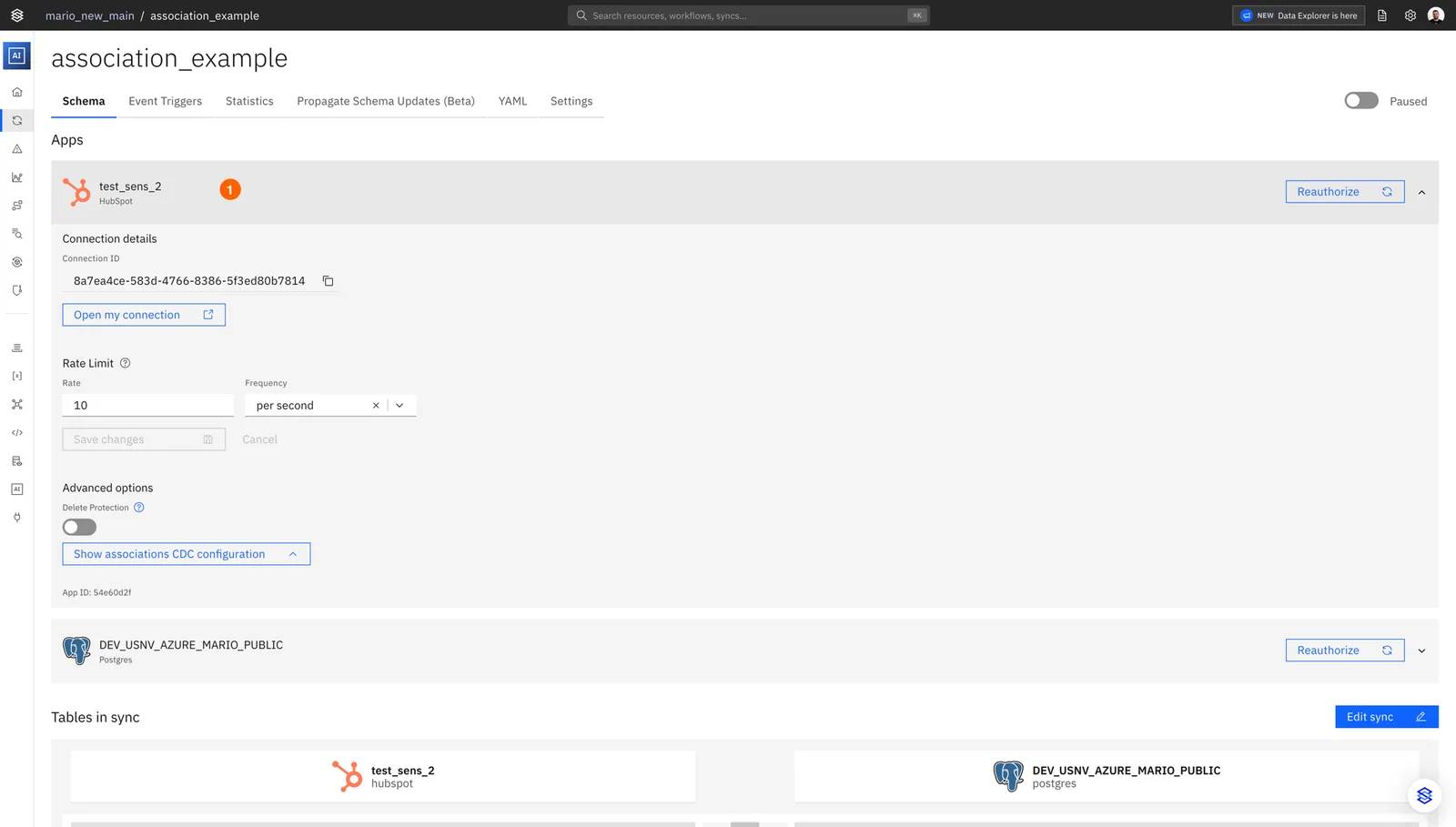
- At the bottom of the section, click Show associations CDC configuration.
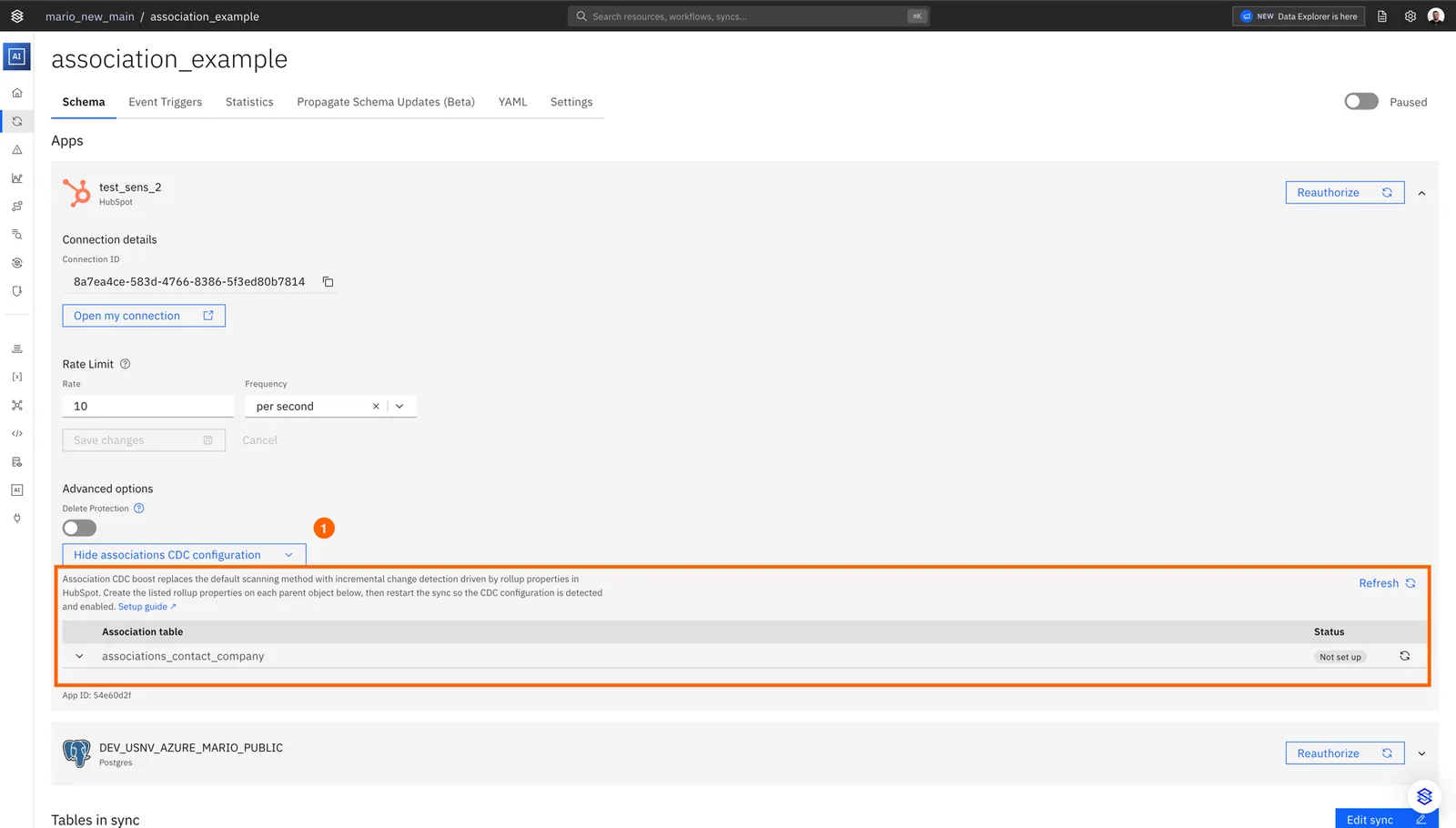
- For each table, click the chevron on the row to expand it. The panel lists every expected rollup property name and the HubSpot object they belong to.

The status column tells you where each table stands:
| Status | Meaning |
|---|---|
| CDC boosted | CDC is currently active for this table. |
| Fully set up | Every expected rollup property exists in HubSpot. CDC will turn on at the next sync restart. |
| Partial setup | The unlabeled _label_none rollup is present — CDC will work. Labeled rollups are missing but optional. |
| Not set up | The unlabeled _label_none rollup is missing. CDC cannot turn on until that one property is created. |
Use this panel as the source of truth for the rest of the steps below — it removes any ambiguity about which object to create the rollups on.
2. Navigate to Properties in HubSpot
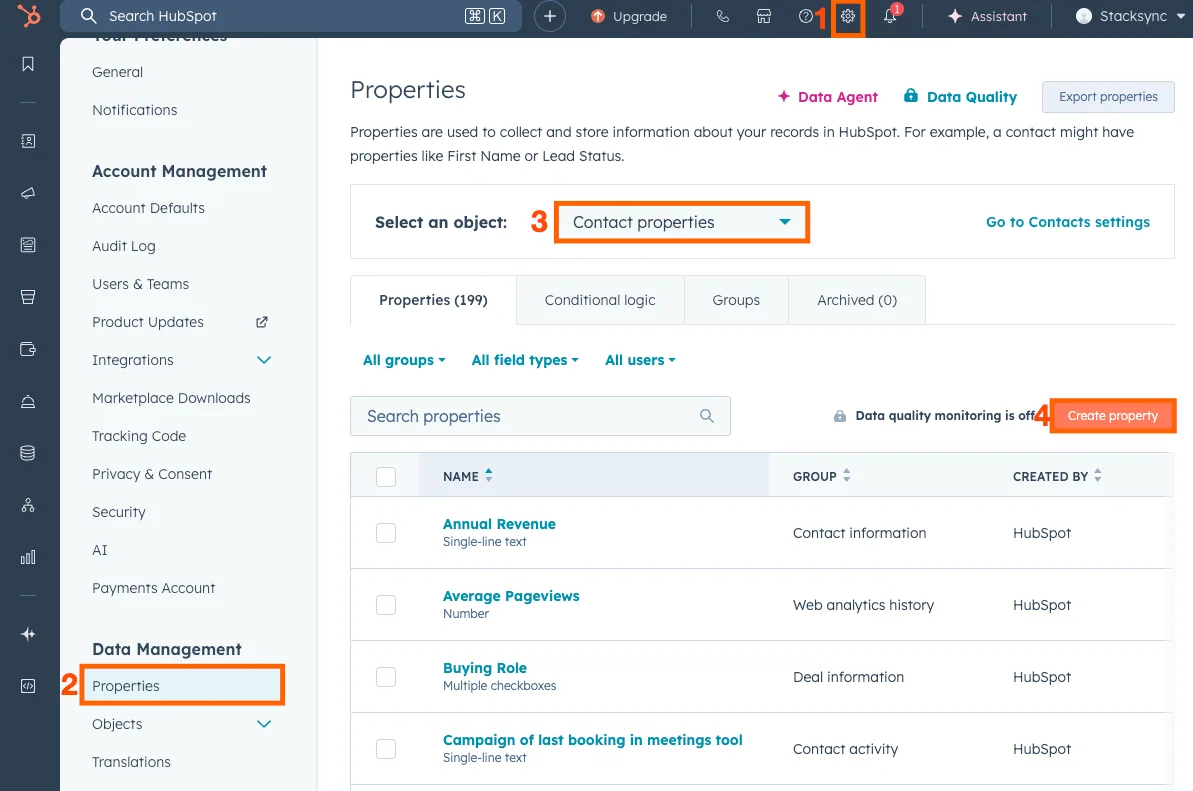
- In your HubSpot account, click the Settings icon (gear) in the top navigation bar.
- In the left sidebar, go to Data Management → Properties.
- Select the object type where the properties will be created — use the object that the Show associations CDC configuration panel tells you to use for that table (the first object in the association table name, or its fallback).
- Click Create property to start the setup.
3. Create Rollup Fields
You only need one rollup field per association table for CDC to work: the unlabeled one (_label_none). Anything beyond that is optional and only refines per-label change tracking.
- Required — one rollup field for associations with no labels (the unlabeled
_label_nonerollup). Without this, CDC cannot turn on. - Optional — one rollup field per association label you actively use (e.g.
_label_primary,_label_billing_contact). Without these, CDC still works — HubSpot just treats all labeled associations as a single bucket and you lose per-label change tracking.
If you only create the unlabeled rollup and skip the labeled ones, the Show associations CDC configuration panel will report the table as Partial setup. That is not an error: it means CDC will run, just without per-label resolution.
3.1 Naming Convention
Property labels must follow this pattern:
sync_associations_{object1}_{object2}_label_{suffix}Components:
sync_associations_- Required prefix{object1}- First object in your association table name, lowercase plural (e.g.contacts,companies,deals){object2}- Second object in your association table name, lowercase plural (e.g.tickets,deals,line_items)label_- Required separator{suffix}- Eithernone(for unlabeled) or the label name in lowercase (e.g.,primary)
Examples:
| Association | Unlabeled Field | Primary Label Field |
|---|---|---|
| Contact ↔ Ticket | sync_associations_contacts_tickets_label_none | sync_associations_contacts_tickets_label_primary |
| Company ↔ Contact | sync_associations_companies_contacts_label_none | sync_associations_companies_contacts_label_primary |
Important: Use lowercase plural forms (e.g.,
contactsnotContact)
3.2 Create the "No Labels" Rollup Field
Click Create property and configure:
| Field | Value |
|---|---|
| Object type | The object indicated by the Show associations CDC configuration panel (the first object in the association table name) |
| Group | Use the default group for that object (e.g., Contact information) |
| Label | sync_associations_{object1}\_{object2}_label_none |
| Field type | Calculation property → Rollup |
| Rollup type | Sum |
| Number format | Formatted number |
| Association record type | The other object (e.g., Ticket) |
| Association labels | All association labels |
| Property to calculate | Record ID |
Example for Contact-Ticket:
- Label:
sync_associations_contacts_tickets_label_none - Create on: Contact
- Association record type: Ticket
Click Create to save.
3.3 Create a Rollup Field for Each Association Label
If you use association labels (like "Primary", "Secondary", etc.), create one rollup field for each label.
Click Create property and configure:
| Field | Value |
|---|---|
| Object type | Same as above |
| Group | Use the default group |
| Label | sync_associations_{object1}\_{object2}_label_{labelname} |
| Field type | Calculation property → Rollup |
| Rollup type | Sum |
| Number format | Formatted number |
| Association record type | The other object |
| Association labels | Select association labels → Select ONLY this specific label |
| Property to calculate | Record ID |
Example for Contact-Ticket with "Primary" label:
- Label:
sync_associations_contacts_tickets_label_primary - Association labels: Select only "Primary"
Repeat this for each association label you use.
4. Enable the Hubspot Association CDC Boost in Stacksync
After creating the rollup fields in HubSpot, restart the sync so Stacksync can re-detect them. There is no manual toggle — Stacksync auto-enables CDC for every association table whose unlabeled _label_none rollup it finds on HubSpot at startup.
- Navigate to your sync in Stacksync.
- Click Stop sync and wait for it to fully stop.
- Click Start sync.
That's it. When the sync starts back up, Stacksync re-checks your HubSpot setup for every association table and automatically turns on the CDC Boost wherever the required rollup property is in place.
To confirm the change took effect, reopen the Show associations CDC configuration panel — any table that previously read Fully set up should now read CDC boosted.

5. Maintenance & Monitoring
5.1 Custom rollup fields monitoring
Stacksync re-evaluates rollup configuration in two ways:
- At every sync restart — when you stop and start the sync, Stacksync re-detects which rollups exist for every association table and updates CDC eligibility accordingly. Creating a previously-missing rollup and restarting the sync is enough to turn CDC on for that table.
- Continuously, in the background — Stacksync periodically verifies that the rollup properties it relies on still exist in HubSpot. If a rollup property is deleted or modified mid-sync:
- Stacksync automatically detects the issue.
- Falls back to a full association scan for the impacted table.
- Sends an email notification with remediation guidance.
This combination ensures data correctness whether the change happens at restart time or while the sync is running.
5.2 Association Model Change
If HubSpot or your team introduces new association labels for an existing object pair:
- Stacksync automatically detects the change
- You receive an email notification
- The email includes instructions to extend the rollup configuration if needed
This allows association models to evolve safely over time without silent data gaps.
5.3 Operational Guarantees
- No data loss if rollups are misconfigured or removed
- Automatic fallback mechanisms
- Explicit customer notifications on required actions
- Designed for enterprise-scale data volumes and SLAs
Summary
The Associations CDC Boost replaces slow full-scan or webhooks approaches with a scalable, incremental, and reliable detection mechanism. By leveraging HubSpot rollup properties, Stacksync enables real-time association syncing that meets enterprise performance and reliability requirements.
If you have any questions or run into any blockers, reach out anytime at hello@stacksync.com and the Stacksync team will be happy to help.