# Get started with the Connector Development Kit

Stacksync allows you to design, code and deploy your own custom connectors and use them within any of your workflows. This allows you to integrate any application of your choice into your existing pipelines.

## Create a connector

### 1. First, go to your Stacksync Profile

{% embed url="<https://dev.stacksync.com/profile>" %}

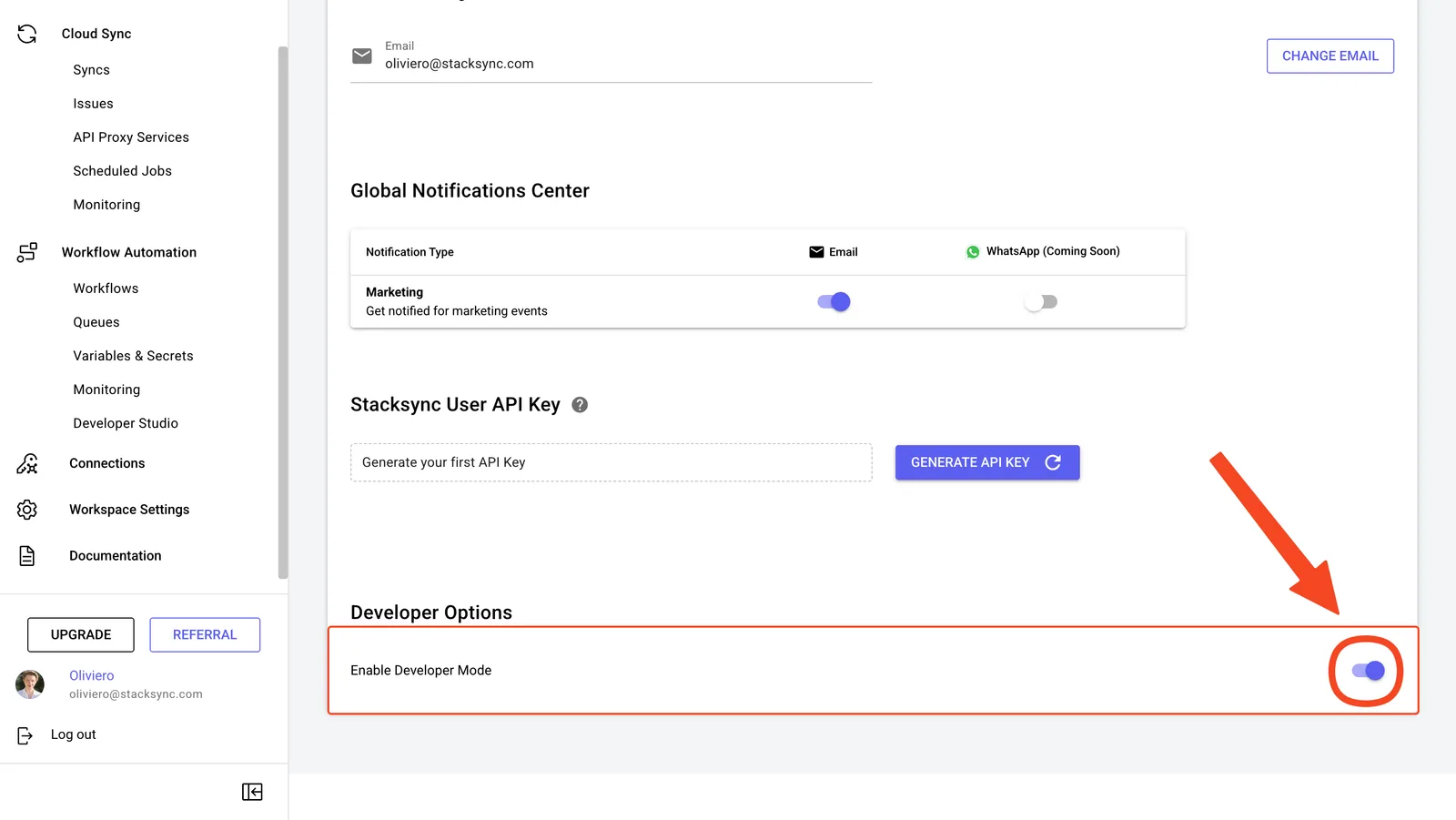
### 2. Enable Developer Mode

<figure><img src="https://2867423571-files.gitbook.io/~/files/v0/b/gitbook-x-prod.appspot.com/o/spaces%2FfJjIdV9cuW6K8asJjTPJ%2Fuploads%2FXipEWVTvsHoPBHXJGVTz%2FSCR-20250609-rdgl.png?alt=media&#x26;token=46cfed3c-a120-40e5-bde1-b646d9d7667c" alt=""><figcaption></figcaption></figure>

### 3. Join our Slack Community!

{% content-ref url="../start-here/community" %}
[community](https://docs.stacksync.com/two-way-sync/start-here/community)
{% endcontent-ref %}

### 4. Get started developing your connector.

{% content-ref url="build-a-custom-connector" %}
[build-a-custom-connector](https://docs.stacksync.com/two-way-sync/developers/build-a-custom-connector)
{% endcontent-ref %}