

Managed authentication
Secure application access with EOS sign-in, workspace policies, and user or group grants.
Make an internal tool available to the people who need it without building a separate sign-in system for each app. EOS managed authentication controls access to deployed applications on their Stacksync app routes.
For a business team, this makes a new tool easier to share. For IT, it provides a consistent application access layer: the people who use a workflow do not need permission to administer its code, credentials, or deployment settings.
Connect to your enterprise identity environment
Microsoft Entra ID and Okta connections are available through enterprise setup. Coordinate with your identity administrator and the Stacksync team to configure the connection for your organization. This brings EOS managed authentication into your existing identity environment and reduces the need for a separate identity integration in each application.
Enterprise identity setup and application permissions serve different purposes: the identity connection establishes who the user is; EOS workspace membership, app policies, and resource grants determine what they can access. Agree the sign-in and user-management configuration during enterprise setup, then use the controls below to share each application with its intended audience.
Workspaces without enterprise identity setup use the EOS sign-in flow described in the Quick start.
Configure application access
The app's Owner chooses an access policy in Applications → your application → Users and Access → Who can access the app?
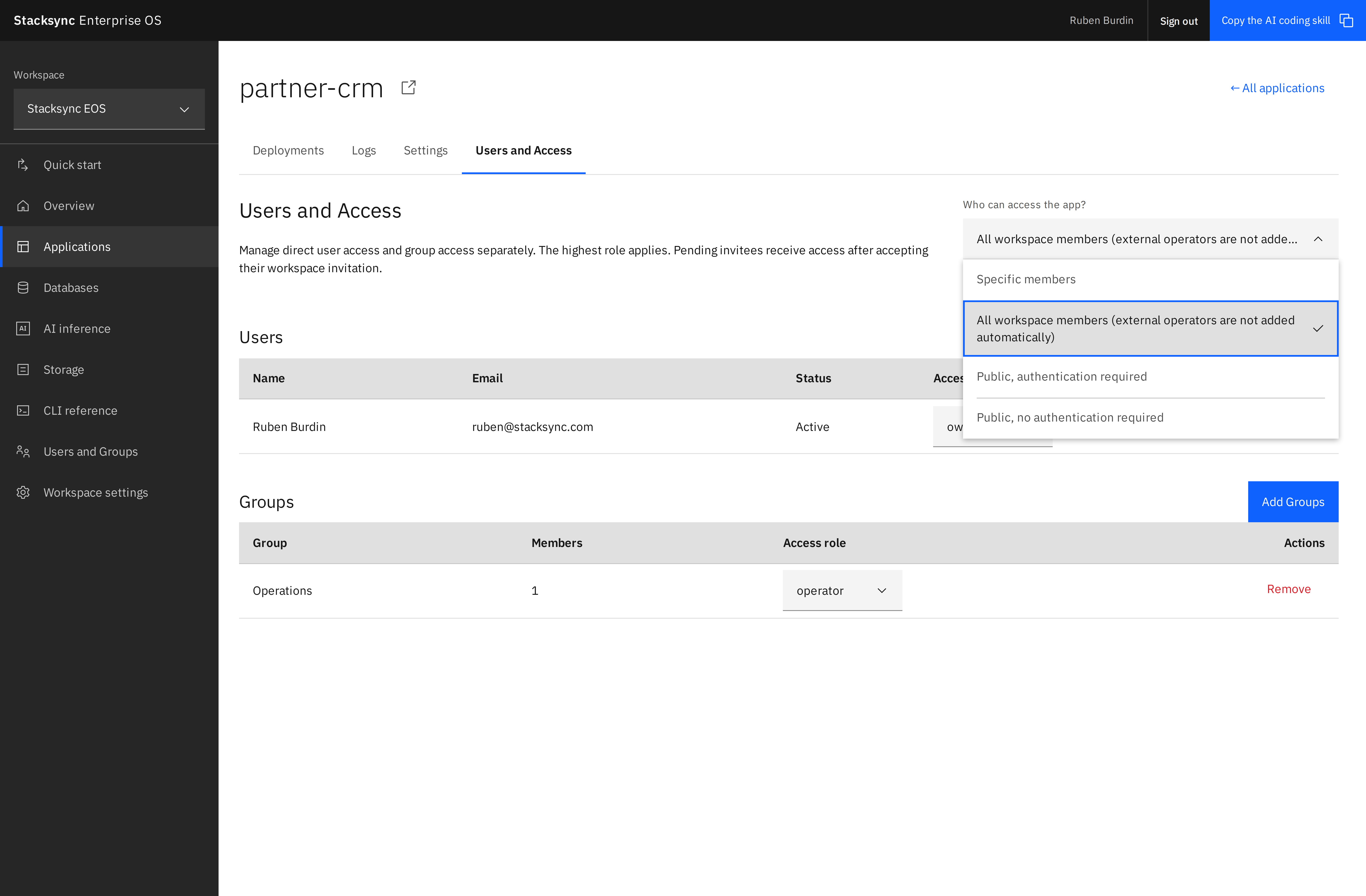
Choose who can use the app
| Policy | Who can open the application |
|---|---|
| Specific members | Active users with an explicit app membership or an applicable direct or group app grant. External Operators can receive Operator grants. |
| All workspace members | Workspace Admins and Members, plus explicit app members and authorized External Operators. |
| Public, authentication required | Any active EOS account with a valid sign-in credential, including people outside the workspace. |
| Public, no authentication required | Anyone, including visitors who have not signed in. |
New applications created in account workspaces default to All workspace members. Guest apps are public, and claiming their workspace preserves the public policy. Redeploying an existing app preserves its selected policy. Policy changes apply to subsequent requests.
For an internal finance tool, choose Specific members and grant the Finance group Operator access. For a company-wide tool, All workspace members admits the internal workspace automatically. Use a public policy only when the application is intended for that audience.
What a user experiences
- The user opens the application's Stacksync URL.
- If the policy requires authentication, EOS asks the user to sign in when no valid app session exists.
- EOS checks the user's identity against the current app policy and applicable workspace or resource grants.
- An authorized user receives an app-scoped session and can use the app. A user who does not qualify is denied access.
The check happens on each request at the application access boundary, including API requests. The gateway checks the policy for public apps too: anonymous traffic passes only when the app is configured to allow it. If the policy service is unavailable, the gateway refuses the request rather than assuming the app is public. Your application still enforces business-specific permissions, such as which customer records a salesperson may edit.
App use and app management are separate
Operator lets someone use an app without discovering or configuring it in the EOS management interface. Editor and Owner grant broader management capabilities. Public runtime access does not make the application's source, deployment variables, or management settings public.
Likewise, a broad runtime policy can still admit a user after you remove a direct grant. To restrict an application to a particular team, choose Specific members, then manage the relevant user and group grants.
Use groups for team access
- A workspace Admin creates a group under Users and Groups and adds its members.
- The app Owner opens Users and Access → Add Groups.
- Select the group and grant Operator for app use, or a management role if the group needs to build or administer the app.
- Use Specific members when only explicitly shared users and groups should be admitted.
Removing a person from the group removes access inherited through that group. Their direct grants and membership in other authorized groups still apply.
External Operators are useful for partners who should use a particular app without access to the workspace directory. Groups containing External Operators can receive only Operator grants on apps.
Call an authenticated app from a backend
Create a personal API key in your EOS profile and send it directly to the app as a bearer credential:
curl "$APP_URL/api/orders" \
  -H "Authorization: Bearer $EOS_PERSONAL_API_KEY"
The key is an opaque bearer token. You do not need to mint or exchange a JWT. EOS resolves the key to its active user and checks that user's current app access and role on every request. Revoked keys and disabled users cannot authenticate. On public apps, a request without a valid identity can still pass anonymously under the public policy.
Personal keys identify a person. App access tokens identify the application when its backend manages app roles and users. CLI management tokens, AI inference keys, and storage keys have separate purposes. Do not expose a personal key to frontend code.
Read the current user
Browser code can request the current identity from its own app URL:
const response = await fetch('/__stacksync/identity');
if (response.status === 401) {
  // Offer sign-in with /__stacksync/login?return_to=/ on this app.
} else if (response.ok) {
  const identity = await response.json();
  // Use identity.app_role to choose which controls to display.
  // Enforce the same permissions in your backend.
}
An authenticated response contains exactly these five fields:
{
  "app_id": "42",
  "eos_resource_role": "operator",
  "app_role": "accountant",
  "email": "person@example.com",
  "user_id": "7"
}
IDs are strings. app_role is the assigned custom role ID, or null when no role is assigned. A user without an EOS resource grant defaults to operator; this does not grant EOS management access. The identity endpoint returns 401 with a login_url when there is no authenticated user, even when the app itself is public.
API callers can read the same endpoint using their personal bearer key. Backend handlers receive the equivalent verified identity in request headers:
| Header | Value |
|---|---|
X-Stacksync-App-Id | App ID. |
X-Stacksync-User-Id | User ID for an authenticated request. |
X-Stacksync-User-Email | Percent-encoded email; decode once with decodeURIComponent or the equivalent. |
X-Stacksync-Eos-Resource-Role | Effective EOS resource role. |
X-Stacksync-App-Role | Custom app role ID; absent when unassigned. |
The gateway removes caller-supplied identity headers and strips EOS bearer credentials and authentication cookies before forwarding requests. An anonymous public request has no user identity headers. Build authorization on the user ID and app role verified by your backend, not an email or role supplied by browser JavaScript. A frontend role check only controls presentation.
These headers are trustworthy only on requests received through the EOS gateway. Restrict separately reachable origins before relying on forwarded headers as the sole authorization boundary.
Sign in and out
Link to /__stacksync/login?return_to=/your-page on the app to start sign-in. EOS reuses a valid EOS session or asks the person to sign in, then returns them to the app with a Secure, HttpOnly, app-scoped session cookie. Protected browser navigations redirect to sign-in; API requests return 401 and a login_url instead of replaying the request after login.
For app logout, make a same-origin POST /__stacksync/logout. This revokes the app session and clears its cookie. EOS account logout also invalidates app sessions tied to that account session. Role assignments and policy changes are evaluated on subsequent requests.
Managed authentication protects Stacksync application routes. Treat any separately exposed origin or alternate URL as a separate infrastructure access boundary.
Continue with access and permissions for the full role model.