

Associations CDC Boost
Many teams expect to track association changes in HubSpot the same way they track record updates: incrementally and in near real time. In practice, that’s not possible.
HubSpot does not provide a native mechanism to incrementally detect association changes (CDC). As a result, tracking association updates at scale is challenging and often inefficient. To know what changed, the only option is to repeatedly read the entire associations dataset. This works at small scale, but as association volumes grow, sync times degrade rapidly.
| Number of Associations | Time to Detect Changes |
|---|---|
| < 10,000 | < 1 minute |
| 100,000 | < 10 minutes |
| 1,000,000 | > 1 hour |
The situation gets worse when multiple association tables are involved. Each table must be scanned independently, and HubSpot’s API concurrency limits quickly become a bottleneck.
At first glance, Hubspot native webhooks seem like a solution. In reality, they are unreliable especially at scale and do not support associations involving custom objects. For teams running real-time, mission-critical pipelines, this creates a hard blocker.
Solution: Associations CDC Boost
To meet these requirements, we took a different approach.
Instead of polling association tables directly or relying on unpredictables Hubspot webhooks, Stacksync monitors these rollup properties to instantly identify which records have experienced association changes.
This provides a deterministic, incremental signal suitable for real-time mission-critical workloads.
Key Benefits
- Association changes detected in seconds instead of minutes.
- Dramatically lower API usage.
- Predictable, fast, and scalable syncs suitable for mission-critical real-time pipelines.
- Free and Starter Hubspot accounts can't benefit of Stacksync CDC Boost.
- The following setup must be performed by a HubSpot Admin or Super Admin.
- This setup is recommended only for associations tables with more than 10,000 records.
1. Identify Your Association Tables
Determine which association tables you want to speed up. For each association (e.g., Contact-Ticket, Company-Deal), you'll create rollup fields on the alphabetically first object.
Which object to create properties on:
| Association | Create Properties On | Why |
|---|---|---|
| Contact ↔ Ticket | Contact | C comes before T |
| Company ↔ Contact | Company | Company comes before Contact |
| Contact ↔ Deal | Contact | C comes before D |
| Deal ↔ Line Item | Deal | D comes before L |
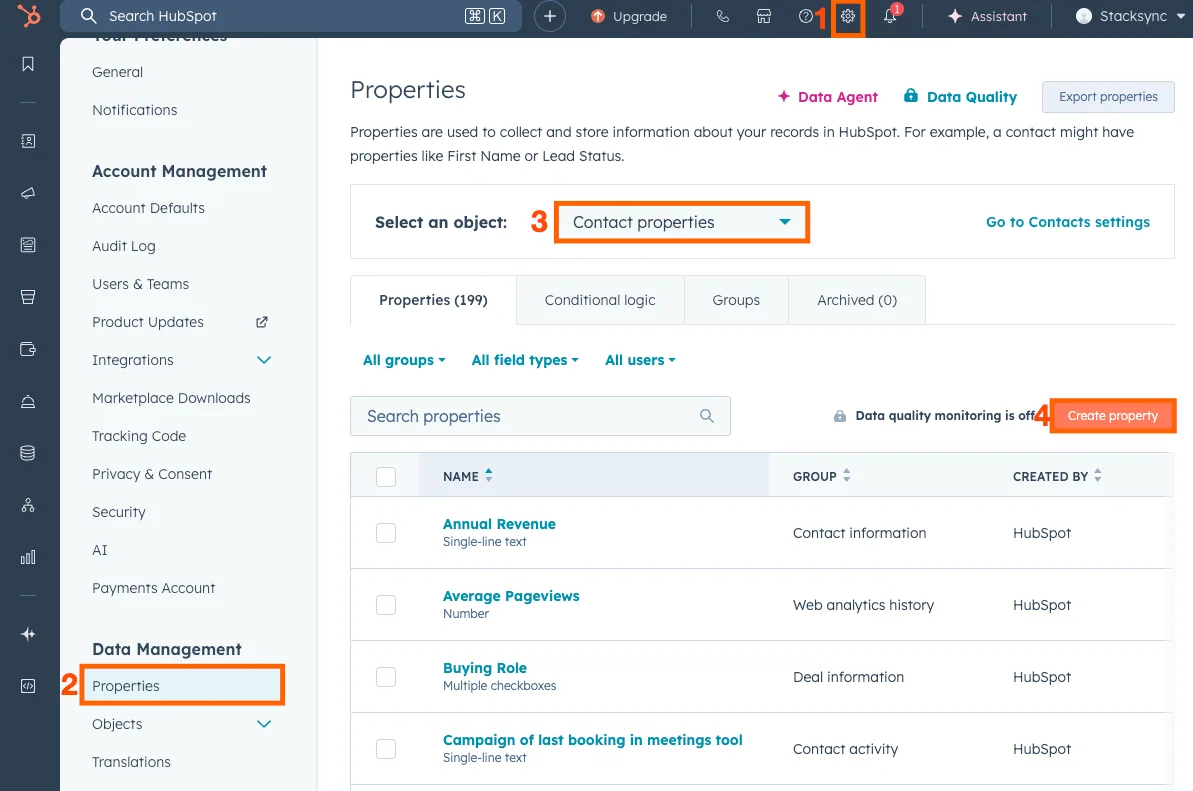
2. Navigate to Properties in HubSpot
- In your HubSpot account, click the Settings icon (gear) in the top navigation bar.
- In the left sidebar, go to Data Management → Properties.
- Select the object type where the properties will be created (choose the alphabetically first object).
- Click Create property to start the setup.
3. Create Rollup Fields
You need to create multiple custom rollup fields for each association:
- One rollup field to sync associations with no labels (unlabeled associations).
- One rollup field for each association label you use.
3.1 Naming Convention
Property labels must follow this pattern:
sync_associations_{object1}_{object2}_label_{suffix}Components:
sync_associations_- Required prefix{object1}- First object (lowercase, plural):contacts,companies,deals{object2}- Second object (lowercase, plural):tickets,deals,line_itemslabel_- Required separator{suffix}- Eithernone(for unlabeled) or the label name in lowercase (e.g.,primary)
Examples:
| Association | Unlabeled Field | Primary Label Field |
|---|---|---|
| Contact ↔ Ticket | sync_associations_contacts_tickets_label_none | sync_associations_contacts_tickets_label_primary |
| Company ↔ Contact | sync_associations_companies_contacts_label_none | sync_associations_companies_contacts_label_primary |
Important: Use lowercase plural forms (e.g.,
contactsnotContact)
3.2 Create the "No Labels" Rollup Field
Click Create property and configure:
| Field | Value |
|---|---|
| Object type | The alphabetically first object (e.g., Contact) |
| Group | Use the default group for that object (e.g., Contact information) |
| Label | sync_associations_{object1}\_{object2}_label_none |
| Field type | Calculation property → Rollup |
| Rollup type | Sum |
| Number format | Formatted number |
| Association record type | The other object (e.g., Ticket) |
| Association labels | All association labels |
| Property to calculate | Record ID |
Example for Contact-Ticket:
- Label:
sync_associations_contacts_tickets_label_none - Create on: Contact
- Association record type: Ticket
Click Create to save.
3.3 Create a Rollup Field for Each Association Label
If you use association labels (like "Primary", "Secondary", etc.), create one rollup field for each label.
Click Create property and configure:
| Field | Value |
|---|---|
| Object type | Same as above |
| Group | Use the default group |
| Label | sync_associations_{object1}\_{object2}_label_{labelname} |
| Field type | Calculation property → Rollup |
| Rollup type | Sum |
| Number format | Formatted number |
| Association record type | The other object |
| Association labels | Select association labels → Select ONLY this specific label |
| Property to calculate | Record ID |
Example for Contact-Ticket with "Primary" label:
- Label:
sync_associations_contacts_tickets_label_primary - Association labels: Select only "Primary"
Repeat this for each association label you use.
4. Enable the Hubspot Association CDC Boost in Stacksync
After creating the rollup fields in HubSpot, you need to edit your sync so Stacksync can detect them.
- Navigate to your sync in StackSync
- Click Stop sync and wait for it to fully stop
- Click Edit sync
- Click Next through each step (no need to change anything)
- Click Save on the final step
- Click Start sync to resume
Note: You don't need to change any settings. Going through the edit process allows StackSync to scan your HubSpot account and detect the new rollup fields.
5. Maintenance & Monitoring
5.1 Custom rollup fields monitoring
Stacksync continuously monitors all required rollup properties. If a rollup property is deleted or modified in HubSpot:
- Stacksync automatically detects the issue
- Falls back to a full association scan for the impacted table
- Sends an email notification with remediation guidance
This ensures data correctness even in misconfiguration scenarios.
5.2 Association Model Change
If HubSpot or your team introduces new association labels for an existing object pair:
- Stacksync automatically detects the change
- You receive an email notification
- The email includes instructions to extend the rollup configuration if needed
This allows association models to evolve safely over time without silent data gaps.
5.3 Operational Guarantees
- No data loss if rollups are misconfigured or removed
- Automatic fallback mechanisms
- Explicit customer notifications on required actions
- Designed for enterprise-scale data volumes and SLAs
Summary
The Associations CDC Boost replaces slow full-scan or webhooks approaches with a scalable, incremental, and reliable detection mechanism. By leveraging HubSpot rollup properties, Stacksync enables real-time association syncing that meets enterprise performance and reliability requirements.
If you have any questions or run into any blockers, reach out anytime at hello@stacksync.com and the Stacksync team will be happy to help.