

Make a Custom Entity Syncable by Stacksync
Custom data entities in Dynamics 365 Finance & Operations are not always exposed to the APIs that Stacksync uses. If you don’t see your custom entity in Stacksync’s list, follow the steps below to make it available with as little developer involvement as possible.
1. Confirm the entity exists
-
In D365 F&O, in the search bar search for Data management → Data entities.
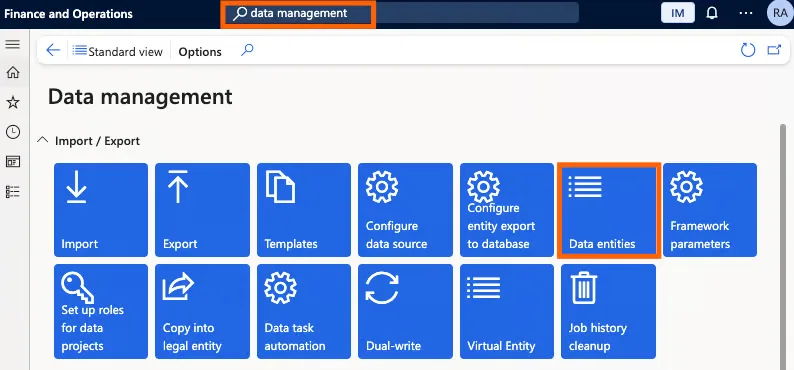
-
Search for your custom entity by its name or label.
Once you confirm the custom data entity exists, you can move on to checking whether it is API‑exposed.
2. Check if the entity is API-exposed
- While signed into D365, open a new browser tab and go to:
https://<your-environment-url>/data
For example:https://yourorg.operations.eu.dynamics.com/data.https://yourorg.sandbox.operations.eu.dynamics.com/data.
- Use the browser search (Ctrl+F or Cmd+F) and look for a collection name that matches your entity, usually in plural form (for example,
MyCustomEntities).
Interpretation:
- If you find the entity:
- The entity is already API-exposed.
- In Stacksync, refresh the list of entities/tables in your Dynamics connector; the entity should be available to select and sync.
- If you see cannot see it under
/data:- The entity exists Stacksync cannot access it via API.
3. If the entity is not API-exposed: what to ask a developer
Making an entity API-exposed requires a small, one-time change in the development environment. To keep this focused, send your D365 developer or partner the following brief request:
Goal: Make custom data entity
<EntityName>API-exposed so Stacksync can sync it.
Environment:<your D365 environment URL>
Ask them to:
- Open the custom data entity in the development workspace.
- Select the root node of the entity and set these properties:
- IsPublic =
Yes - Public Entity Name = singular name (e.g.
MyCustomEntity) - Public Collection Name = plural name (e.g.
MyCustomEntities)
- IsPublic =
- Build and deploy the model to the target environment.
- Confirm the entity is now API-exposed by repeating step 2.
Note that setting IsPublic = Yes does not make the entity publicly accessible on the internet.
It only exposes the entity through the OData API for authenticated and authorized users. Without this flag, the entity is simply not available via the API at all.
If you have any questions or run into any blockers, reach out anytime at hello@stacksync.com and the Stacksync team will be happy to help.