

Dynamic Data Referencing
Every node in your workflow can pass data to the next. Instead of hardcoding values, you can dynamically reference outputs from any previous node directly in your module's input fields.
How It Works
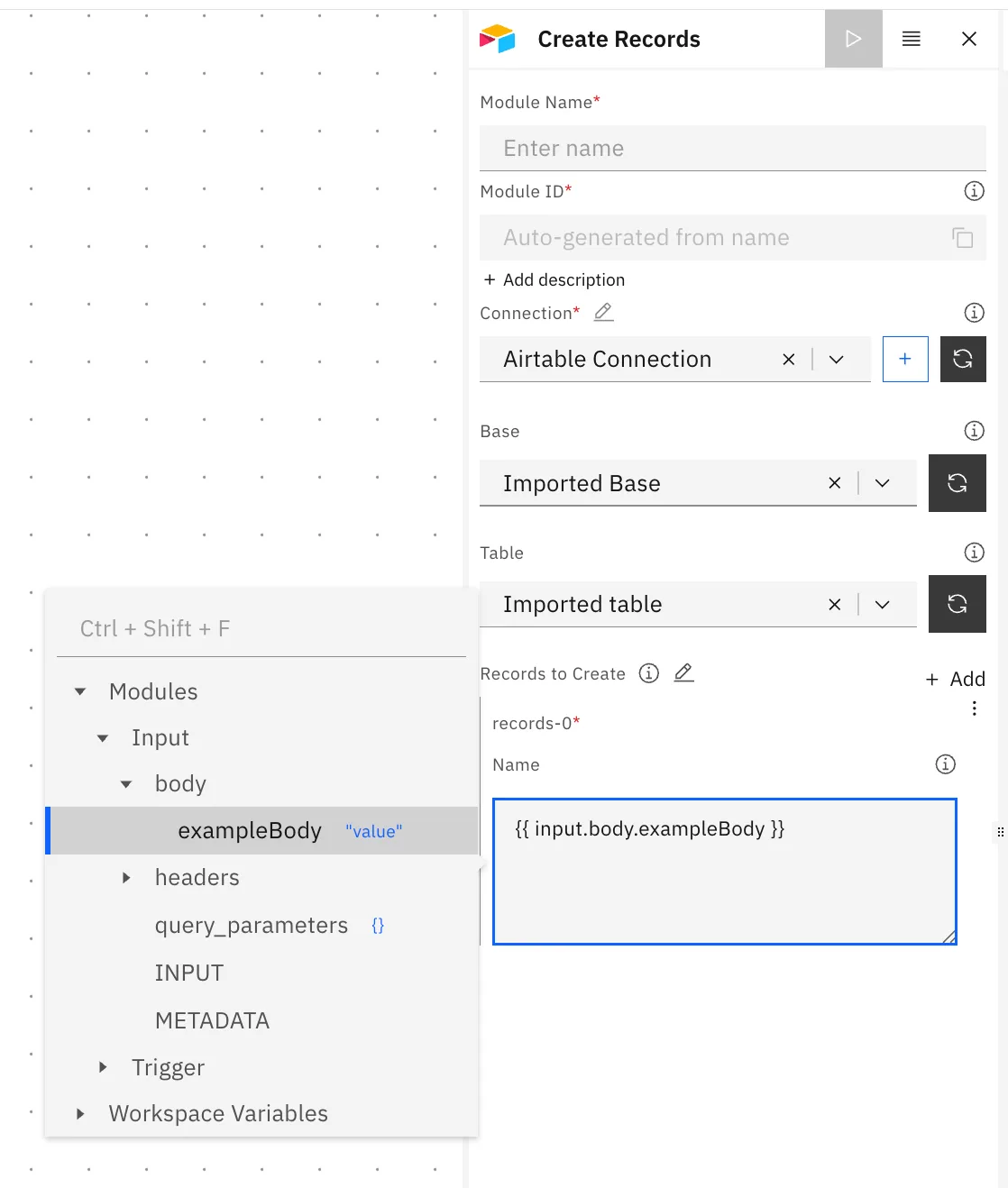
When configuring any module field, click into the field to open the variable picker. This shows a live tree of all available data in your workflow at that point, including outputs from previous nodes, trigger data, and workspace variables.
Selecting a value automatically inserts the reference into your field.
Reference Syntax
All references use double curly bracket syntax:
{{ module_id.field }}For nested fields:
{{ module_id.field.subfield }}Module ID is the unique identifier for each node, auto-generated from the module name. It is what you use in
{{ }}references, not the display name. You can find and copy it in the module configuration panel.
Example
If the Input module received this payload:
{
  "body": {
    "exampleBody": "value"
  }
}
You would reference it in a downstream node as:
{{ input.body.exampleBody }}Using the Input Module
Recommended: Always reference trigger data through the Input module rather than directly from the Trigger. The Input module normalises the incoming payload and is the recommended way to access trigger data in downstream nodes.